
Guides & Tutorials
How to Capture and Share Your Best Retro Gaming Moments on Android
There's nothing quite like the feeling of finally beating that notoriously difficult boss in a 16-bit classic or executing a flawless combo in a retro fighting game. But when you're playing on an Android emulator or a dedicated handheld device, capturing those fleeting moments hasn't always been easy.
In the past, you'd have to rely on clunky third-party screen recorders, manage endless files, or hope that your emulator's built-in tools were up to the task. Today, we're showing you the absolute best way to seamlessly capture, save, and share your retro gaming highlights directly from your Android device.
The Challenge of Retro Game Capture on Android
Most Android screen recording tools are designed for general phone usage. When applied to retro gaming, they often introduce input lag, drain battery life rapidly, or fail to capture the internal audio properly. For dedicated handhelds like the Retroid Pocket or AYN Odin, managing heavy video files can quickly eat up your precious storage space meant for ROMs.
The ideal capture solution needs to be:
- Always-on: You never know when an amazing moment will happen.
- Lightweight: Zero impact on your emulator's performance or framerate.
- Instant: Accessible with physical buttons rather than touchscreen menus.
Enter PlayGoals: The Ultimate Companion App
This is exactly why we built PlayGoals. Beyond tracking your playtime and giving you daily motivational retro gaming goals, PlayGoals features an incredible Instant Replay Buffer designed specifically for emulators like RetroArch, Dolphin, and PPSSPP.
Save the last 30 seconds instantly
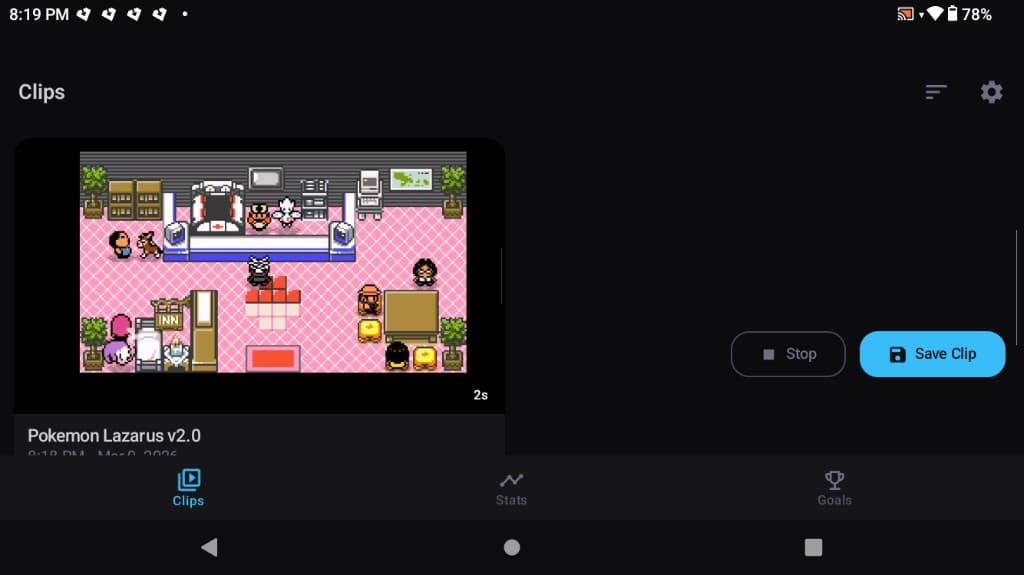
An always-on replay buffer captures your gameplay in the background without draining your battery.
How to Set Up Instant Capture
Getting started is incredibly simple and requires no root access or complex configuration.
1. Install and Grant Permissions
Download the PlayGoals APK and install it on your Android device. When you first launch the app, grant it the necessary "Screen Recording" and "Accessibility" permissions. These allow it to run securely in the background and detect your emulator activity.
2. Start Playing
Launch your favorite emulator. Whether you're playing carefully curated SNES RPGs on RetroArch or upscaled GameCube classics on Dolphin, PlayGoals runs silently. It keeps a rolling 30-second window of your gameplay cached in memory.
3. Hit the Shortcut
Just pulled off something incredible? Press Volume Up + Volume Down together. PlayGoals instantly flushes the buffer to your storage, saving a high-quality video file with internal audio. You don't need to pause your game or open any menus.
Sharing Your Moments
Once your clip is saved, it automatically populates in the PlayGoals dashboard. From there, you can easily trim the video and share it out to Discord, X (Twitter), or Reddit with a single tap. The app automatically tags the game you were playing, making your posts look incredibly professional.
Ready to Level Up?
If you're serious about your retro gaming library and want to build an archive of your best memories, standard screen recorders just don't cut it. Give the PlayGoals buffer a try and you'll never miss a critical hit, a speedrun skip, or a hilarious glitch ever again.